Skip to content

World

Topics from outside of this forum. Views and opinions represented here may not reflect those of this forum and its members.

A world of content at your fingertips…

Think of this as your global discovery feed. It brings together interesting discussions from across the web and other communities, all in one place.

While you can browse what's trending now, the best way to use this feed is to make it your own. By creating an account, you can follow specific creators and topics to filter out the noise and see only what matters to you.

Ready to dive in? Create an account to start following others, get notified when people reply to you, and save your favorite finds.

Register Login
  • ohad.mO

    So, What's New?

    • Zoom & Display Improvements
      • Zoom controls in the title bar — The zoom icon now stays in the top title bar, so it remains easy to find and use when you zoom in and out.
      • Higher zoom levels — You can now zoom the emulation screen up to 500% for better visibility.
      • Sticky title bar — When zooming, the top bar (with macros, zoom, and keys) stays visible so you always have quick access to controls.
      • Updated zoom control — The zoom selector has been redesigned as a popover with improved colors and appearance.
    • Emulator Display
      • Clearer text — Emulator text is now bolder and easier to read, especially on colored backgrounds.
      • Grid lines fixed — Vertical grid lines now display correctly on fields that use background colors.
    • Session & Reliability
      More accurate session timeout — Session timeout is now based on real activity time instead of browser timing, so it behaves correctly even when the browser slows down or throttles.
    • Type-ahead improvements
      The type-ahead feature has been updated to avoid getting stuck. If it does get stuck, it will automatically recover and refresh the screen so you can continue working without interruption.
    • Host keys and key mappings — Host keys are now grouped with key mappings for a clearer, more logical layout.

    Bug Fixes

    • Multi-line Fields
      Natural line navigation — When typing in multi-line fields, reaching the end of a line now moves the cursor to the next line instead of jumping to the next field. The cursor only moves to the next field when you reach the end of the last line.
      Organization

  • eddie.kE

    v3.0.15 — Patch Notes

    ✨ New & Improved

    Convert to RPC — Additional Files (Datasets + Members)

    • Added Dataset selector as a searchable dropdown (filter + pick from list).
    • Added Member selector as a searchable dropdown (filter + pick from list).
    • Both dropdowns support searching across different filters to quickly find the right target.

    Convert to RPC — Custom Copybooks (Datasets + Members)

    • Added Dataset selector as a searchable dropdown (filter + pick from list).
    • Added Member selector as a searchable dropdown (filter + pick from list).
    • Both dropdowns support searching across different filters for faster selection and fewer mis-picks.

    Logout UX Refresh

    • Moved Logout into a user dropdown menu under the username.
    • Removed the standalone right-side logout button for a cleaner header and more consistent navigation.

    AI Assistant — UI/UX Redesign + New Models

    • Redesigned AI Assistant UI to a more modern look and flow.
    • Added model options:
      • claude-opus-4-6
      • claude-sonnet-4-6

    🐛 Bug Fixes

    • Fixed tab order after refresh to restore the previous tab ordering instead of reshuffling.
    • Fixed screen jumping during Test Asset / Compile flows.
    • Fixed AI assistant “apply code” behavior so edits are now undoable (Ctrl+Z) reliably.

  • ohad.mO

    🚀 New Features

    • Connections can now be imported directly from OL Hub.

    • The emulator now alerts users one minute before session inactivity timeout, allowing them to:

      • Remain connected
      • Actively disconnect
      • Or be automatically disconnected if no response is provided
    • The server now proactively cleans up inactive sessions, preventing sessions from remaining open due to browser crashes, system crashes, or unexpected disconnects.

    ✨ Enhancements

    • Insert Mode Visual Indicator
      While in Insert Mode, the cursor now appears as a thin line, distinguishing it from Overwrite Mode, where it appears as a rectangle.
      This provides clearer visual feedback in addition to the existing status bar badge.

    • Zoom Drop Down Replaced
      Replaced Zoom Drop down with a small modal dialog , it remains open until you're happy with your zoom level.

    • Improved End-of-Field Functionality
      The cursor behavior has been refined:

      • Moves one position after the last character when possible
      • If the field is full, moves to the last position in the field
      • If the field is empty, moves to the first position in the field

    🐞 Bug Fixes

    • Fixed an issue where closing a browser tab did not always close the server connection.
    • Fixed RTL language issues that caused non-alphanumeric characters to be positioned incorrectly.
    • Fixed an issue where the Zoom dropdown caused the display to resize unexpectedly when arrow keys were pressed immediately after changing the zoom level.
    • When a scrollbar is present, the display now scrolls only if the cursor moves outside the visible area.
    • Fixed an issue where AltGr incorrectly triggered actions associated with Ctrl.

  • eddie.kE

    Patch Notes — v3.0.3

    Admin Panel

    • Added Active Users view: admins can see active users, filter by date, and review user actions (create, delete, compile).
    • Added Backend Logs Console in the admin panel to view backend logs from the UI.

    Compile Experience

    • When the Compile dialog opens, the detected template is automatically selected.
    • The template dropdown now labels the detected template as <Template Name> (Detected) (e.g., CICS-DB (Detected)), while other templates appear without the suffix.

    Mainframe Dataset & Members

    • Added right-click on a dataset to open a dialog that lets you search members by content (Mainframe-based search inside member contents).
    • Added Favorite Members: right-click a member to favorite it for quicker access.

    Editor / UX Fixes

    • Fixed the unsaved changes asterisk lagging behind the actual editor state.
    • Added a close confirmation dialog when there are unsaved changes.

  • eddie.kE

    OL Code 3.0.2 — Patch Notes

    Improvements

    Screen-to-RPC conversion feedback

    • Updated success toast message: “Successfully converted screen COBOL program to RPC COBOL program.”

    Admin UX upgrades

    • Added scroll support in Admin views.
    • Added logs view in Admin.

    Admin auditing: active users + actions

    • Admin can now see active users and tracked actions, including:
      • Save member / file / dataset
      • Delete member / dataset
      • Compile

    Compile Dialog Enhancements

    Auto-select detected template

    • When the Compile dialog opens, the detected template is automatically selected.

    Clear “Detected” labeling

    • The dropdown displays the detected template as “CICS-DB (Detected)”.
    • Other templates appear normally (no “(Detected)” suffix).

    Simplified actions

    • The dialog now uses a single Compile button.

  • roi.mR

    For decades, development on mainframe and IBM i systems required specialized terminals, manual build scripts, cryptic debugging methods, and limited collaboration. As enterprises modernize systems, migrate workloads, and expose legacy business logic to new platforms, the need for a modern development experience around COBOL and RPG has never been greater.

    OL Code was built precisely for this reality.

    It is not “just another editor” for COBOL or RPG.
    It is a developer workspace, migration accelerator, and visibility tool—engineered for integrators, migration teams, modernization architects, and IT departments.

    Why OL Code?

    As organizations reimagine their core applications, three needs repeatedly surface:

    Full visibility into the legacy estate
    Programs, copybooks, models, DB references, screen flows

    Structured development capabilities without depending on the terminal
    Editing, compiling, testing, running transactions

    A migration-aware, integration-friendly approach
    Generating APIs, refactoring screen programs, shifting logic into modern workflows

    OL Code was designed as the workbench where these needs converge.

    From Legacy Code to Modern Workflows—Professionally

    Full Mainframe/AS400 Workspace View

    OL Code provides structured navigation of:

    – Programs
    – Copybooks
    – Includes and dependencies
    – Variables and declarations
    – Linkage sections
    – Screen maps
    – DB2 files, tables, and SQL usage

    All visualized in a modern tree view, eliminating guesswork typically involved when tracing cross-file references.

    Dataset Browser & Real-Time Search

    Through seamless connectivity, teams can browse remote datasets:

    – PDS / PDSE libraries and members (z/OS)
    – Source libraries / file systems (IBM i)
    – Historical versions (where supported)

    Powerful search capabilities allow locating:

    – Variables
    – SQL queries
    – Called programs
    – Global fields
    – Copybook usage patterns

    This enables real dependency understanding within seconds—not days.

    Deep Analysis Layer, Powered by Hub Planner

    OL Code integrates with OpenLegacy Hub Planner to reveal insights such as:

    – Which program calls which program
    – What domains specific modules belong to
    – SQL access patterns
    – Variable usage and structure inheritance
    – Resource relationships (files, tables, screens, APIs)

    For integrators and migration teams, this means:

    – Impact analysis before modification
    – Controlled domain isolation
    – Clear modernization segmentation

    A True Modern IDE for COBOL & RPG

    Smart syntax view
    Coloring, folding, auto-alignment

    Code walkthrough
    Hover over fields to reveal type, origin, dependency relationships

    Variable and structure tracing
    Jump to definitions across project boundaries.

    Inline hints and recommendations

    Compiling at the Click of a Button

    OL Code enables:

    Compile COBOL program with one click

    Automatically sends:
    – Generation JCL (z/OS)
    – CRTBNDRPG / CRTSQLRPG / CRTPGM command (IBM i)
    – Bind/link steps

    Prebuilt templates for:
    – COBOL batch
    – CICS program
    – RPG service programs

    Compile Log Viewer
    Errors highlighted, missing references, bind failures

    AI-Assisted Compilation & Troubleshooting

    AI can:
    – Analyze compile errors
    – Suggest corrections
    – Apply fixes

    One-Click Testing — via OL Hub

    Execute programs remotely, validate response, replay test cases.

    Create APIs Directly from COBOL & RPG Code

    Outputs:
    – REST API structure
    – Mapping to fields
    – Code stubs
    – Reverse API bridge

    Screen Programs → RPC Programs

    AI-driven transformation using:
    – Structure inference
    – Screen state flattening
    – Request/response model creation

    Who Benefits Most?

    – Integration partners implementing cloud migration
    – Enterprises migrating gradually
    – Developers modernizing codebases
    – Migration factories

    Where OL Code Fits

    Assessment
    → browsing, impact analysis
    Segmentation
    → dependency understanding
    Refactoring
    → AI assisted code cleanup
    API enablement
    → generation & testing
    Migration
    → reverse API and coexistence
    Centralized Web Application Benefits
    OL Code runs as a modern web application, eliminating dependency on local machine installations.
    It can be installed centrally and accessed through standard browsers, giving users consistent access from anywhere.
    Typical deployment options include container‑based environments, standard enterprise runtime servers, and distributed runtime nodes close to mainframe and IBM i systems.
    This approach greatly simplifies IT operations and accelerates onboarding efforts.
    Teams can maintain a single system upgrade path, eliminating mismatched versions and reducing conflict resolution overhead.
    Security, access control and workspace configuration are managed centrally, ensuring governance and operational traceability.
    Centralized Web Application Benefits
    OL Code runs as a modern web application, eliminating dependency on local machine installations.
    It can be installed centrally and accessed through standard browsers, giving users consistent access from anywhere.
    Typical deployment options include container‑based environments, standard enterprise runtime servers, and distributed runtime nodes close to mainframe and IBM i systems.
    This approach greatly simplifies IT operations and accelerates onboarding efforts.
    Teams can maintain a single system upgrade path, eliminating mismatched versions and reducing conflict resolution overhead.
    Security, access control and workspace configuration are managed centrally, ensuring governance and operational traceability.
    Bottom Line

    OL Code delivers
    – Modern editing
    – Compile automation
    – Integrated testing
    – Migration workflows

    It is the modernization cockpit for mainframe and IBM i.


  • ohad.mO

    🚀 New Features

    • Multiple Connections Configuration
      Administrators can now configure multiple connections for users to choose from, making it easy to switch between environments such as Test and Production.

    • Per-Connection Printer Queue
      The printer queue is now part of the connection properties, allowing each connection to define its own printer queue.

    • Favorite Connection Selection
      Users can mark a connection as their favorite. The emulator will automatically connect to it unless another connection is explicitly selected.

    • New Emulator Client Actions
      Added new client actions including Field Plus, Field Minus, New Line, Clear All Input Fields, and more.
      Refer to the keyboard mappings for available shortcuts.

    • AS400 Printer Panel Improvements

      • Printer spools can be filtered by time period
      • Multiple filters can be applied simultaneously (e.g., User and Queue)
    • AS400 SYSREQ Support
      Added AS400 System Request (SYSREQ) functionality
      (Default key binding: Shift + Esc)


    ✨ Enhancements

    • Improved Numeric Field Validation
      Alphabetic characters are no longer allowed in numeric fields. Users will be notified when invalid input is entered.

    • Persistent Zoom Level
      The zoom level is now saved between sessions—no need to readjust it every time.

    • Copy Entire Screen
      The full screen can be copied without selecting text by invoking the Copy Screen action (Ctrl + C) with no active selection.

    • Improved Handling of Multi-line Fields


  • roi.mR

    Release Notes

    Version 1.5.2 (Latest)

    Release Date: January 20, 2026
    Commit Range: ecc9efde4c72d2


    🎯 Overview

    This release includes significant feature enhancements, security improvements, and infrastructure updates. The version has progressed from 1.4.3 to 1.5.2, introducing major new capabilities in query management, schema visualization, and version management.


    ✨ Major Features

    Query Console Enhancements

    • Saved Queries Functionality: New ability to save, manage, and reuse SQL queries
      • Save queries with custom names and descriptions
      • Browse and load saved queries from a dedicated dialog
      • Enhanced query persistence and retrieval
    • Row Modification Handling: Dynamic UPDATE statement generation for query results
      • Improved CRUD operations in Query Console
      • Enhanced SQL query handling and logging

    Schema Management

    • Schema Creation Prompt: New prompt in connection dialog to create schemas when needed
    • Foreign Key Enrichment: Enhanced schema graph visualization with JDBC foreign key relationships
      • Improved schema graph retrieval with better error handling
      • Enhanced metadata service capabilities

    Hub Integration Improvements

    • Enhanced SQL Query Handling: Improved integration with Hub for asset creation
      • Stored Procedure Support: Added support for CALL statements in SQL queries
      • Procedure Name Extraction: Enhanced table/procedure name extraction from CALL statements with proper normalization
      • Kebab-case Naming: Automatic kebab-case conversion for stored procedures with '-sp' suffix
      • Schema Qualification: Updated query generation prompts to require schema qualification for table names
      • CRUD Dialog Enhancements: Improved user experience with clearer labels (Operation name → Model name)
    • Enhanced Logging & Debugging: Comprehensive logging improvements in HubService
      • Detailed logging for asset creation operations including input parameters and payload structure
      • Enhanced error messages with full request/response context
      • Better debugging information for Hub API interactions
    • Query Console Integration: Improved Query Console integration with Hub
      • Enhanced WHERE clause condition management (AND to OR logic improvements)
      • New methods for better condition management and grouping
      • Added schemaName field to chat for improved context in query generation
      • Better integration between Query Console and Hub asset creation workflows

    Version Management

    • Version Display & Management: Complete version management system implementation
      • Version displayed in application UI (title bar badge)
      • Version API endpoint (/api/v1/version) for runtime version access
      • Version information in startup logs and JAR manifest
      • Automatic version reload on authentication state changes

    🔒 Security Improvements

    Dockerfile Enhancements

    • Removed Python packages to fix multiple CVEs:
      • CVE-2018-20225, CVE-2025-8869, CVE-2023-5752 (pip)
      • CVE-2025-47273, CVE-2024-6345, CVE-2022-40897 (setuptools)
    • Enhanced security configuration for production deployments

    Dependency Updates & CVE Fixes

    • Netty: Updated to 4.1.129.Final (fixes CVE-2025-67735)
    • Protobuf: Updated to 3.25.5 (fixes CVE-2024-7254)
    • Dependency version management improvements in build.gradle.kts
    • Vert.x and Logback version adjustments for compatibility

    🛠️ Infrastructure & Developer Experience

    Version Management Automation

    • Unified Version Bump Scripts: New tag-and-bump.sh script for streamlined version management
      • Single script for version bumping and tagging
      • Support for patch, minor, and major version increments
      • Automatic synchronization between gradle.properties and frontend/package.json
    • Release Workflow Documentation: Comprehensive guides added
      • RELEASE_WORKFLOW.md: CI/CD integration guide
      • VERSIONING.md: Complete version management documentation

    📊 Statistics

    • Total Commits: 28 commits
    • Files Changed: 44 files
    • Lines Added: ~3,406 insertions
    • Lines Removed: ~246 deletions
    • Net Change: +3,160 lines

    Key File Changes

    • Frontend: Query Console, Saved Queries components, Connection Dialog enhancements
    • Backend: Hub Service, Metadata Service, Query Service improvements
    • Infrastructure: Dockerfile, build configuration, version management scripts
    • Documentation: Release workflow, versioning guides

    🔄 Version Progression

    • 1.4.31.4.4: Version management infrastructure
    • 1.4.41.4.6: Version bump script improvements
    • 1.4.61.4.7: Foreign key enrichment
    • 1.4.71.4.8: Schema creation prompt, version display enhancements
    • 1.4.81.4.9: JSON parsing improvements
    • 1.4.91.5.0: Saved queries functionality, Dockerfile security
    • 1.5.01.5.1: Dependency compatibility adjustments
    • 1.5.11.5.2: CVE fixes, final dependency updates

    📝 Notable Changes by Component

    Frontend (frontend/)

    • New saved queries dialog components
    • Enhanced query console with save/load functionality
    • Improved connection dialog with schema creation prompt
    • Version badge in application header
    • Enhanced CRUD dialog components

    Infrastructure

    • Dockerfile security hardening
    • Build configuration updates for CVE fixes
    • Version management scripts and documentation
    • Enhanced logging configuration

    🚀 Migration Notes

    • Version Display: Version is now automatically displayed in the UI. No action required.
    • Saved Queries: New feature available immediately. Existing queries are not migrated automatically.
    • Dependencies: Ensure Docker images are rebuilt with the updated Dockerfile for security fixes.
    • Version Management: Teams can now use the new tag-and-bump.sh script for version management.

    🔗 Related Pull Requests

    • PR #16: Schema graph foreign key enrichment

    Note: This release represents a significant milestone with major feature additions, security improvements, and enhanced developer tooling. All users are encouraged to upgrade to benefit from the new features and security fixes.


  • eddie.kE

    Shared conversion logic

    • Refactored Convert to RPC component logic.
    • Introduced a shared HandleCopybook flow so the same behavior is reused across Test Asset and Convert to RPC.

    AS/400 & Hub

    AS/400 Program → Member

    • Assets coming from IBM i (AS/400) now follow member-based naming and behavior.

    RPGLE support in Hub “Create Asset”

    • Hub now supports creating test assets and running Compile from RPGLE programs.

    Templates

    • Added template preview and restore defaults.
    • Admin templates are protected:
      • Users cannot delete admin templates.

    Create API UX

    • Added module selection.
    • “Create API” no longer forces creation only under the test module — the user can choose a different module.

    Compile / AI / Editor UX fixes (Assaf feedback)

    Compile confirmation copy & layout

    • Fixed missing spaces / punctuation.
    • Long confirmation text is now split into multiple rows for readability.

    Compile rules

    • Compile button is disabled for non-compilable extensions (e.g., CPY).

    AI response focus

    • After an AI answer arrives, the editor now focuses on the start of the response (not the end).

    Unsaved changes

    • “Unsaved changes” dialog now appears when relevant.

  • eddie.kE

    Server URL auto-populated from OpenAPI

    • The Server URL field now auto-populates based on the OpenAPI server definition, reducing manual setup and preventing mismatches.

    Hub URL link now shows full URL

    • Fixed the Link to Hub URL display to show the full URL (no more truncation or confusing partial display).

    File tree actions: delete + rename + create folder

    • Added right-from-the-tree actions:
      • Delete file
      • Rename
      • Create folder (currently mainframe-only; AS/400 support tracked separately)

    Filter title now matches platform terminology

    • Filter titles are now correct per system:
      • AS/400: Library
      • Mainframe: Dataset Prefix

    Templates overhaul + variable explanations (+ ${user})

    • Fixed and cleaned up all templates with clearer variable usage and documentation.
    • Added support for ${user} where relevant.

    Light/Dark UI: icon updates to save space

    • Updated Light/Dark mode toggles to icon-based controls, saving space and reducing header clutter.

    Context info panel (BMS, Screen COBOL)

    • Added a Context Info panel to show relevant context instead of raw/unclear metadata — especially for BMS and Screen COBOL workflows.
    • Context Info now explicitly displays the file type.

    BMS upload improvements

    • Improved the BMS upload flow for better clarity and fewer missteps during upload/association.

    Screen→RPC modes: with AI or without AI

    • Screen-to-RPC now supports:
      • Without AI (deterministic conversion)
      • With AI (assisted generation)

    Screen→RPC wizard button

    • Added a wizard button for Screen→RPC to guide users step-by-step through the flow.

    Convert RPC now mainframe-only

    • The Convert RPC action now appears only for Mainframe, avoiding confusion in AS/400 contexts where it doesn’t apply.

    Member naming uses program ID from file

    • Generation now uses the Program ID inside the file as the member name (instead of relying on external/placeholder names), improving accuracy and consistency.

    Versioning shown next to header (git tag)

    • The UI now displays the current version / git tag next to the header, making it obvious what build you’re running.

  • eddie.kE

    Import → Generate From Hub (terminology update)

    • Renamed “Import from Hub” to “Generate from Hub” to better reflect the actual behavior.

    Runtime key support for “Generate From Hub”

    • Added a runtime key field for Generate from Hub flows, enabling correct auth/runtime behavior during generation.

    Generate ReverseAPI via Generate From Hub

    • You can now generate ReverseAPI directly through Generate from Hub, using the same workflow and options.

    Filter focus: ESC + click outside now works

    • Fixed filter focus “trap” behavior.
    • You can now press ESC (and click outside) to unfocus reliably — applied across relevant filter inputs.

    Clearer error wording: “Library” instead of “Dataset”

    • When entering a non-existing folder, error text was updated from “dataset not exists” to “library does not exist” (correct AS/400 terminology for this context).

    Login as different user now resets tabs

    • Switching users now clears previously opened tabs, preventing cross-user leakage of open files and stale editor state.

    Success messages no longer appear in error dialogs

    • Fixed a UI bug where a success message (e.g., “Save successfully”) could appear inside an error dialog.

    New file creation refreshes the tree

    • Creating a new file now:
      • Refreshes the file tree
      • Expands the relevant folder path
      • Focuses the newly created file automatically

    Correct extensions when creating programs

    • Programs are now created with the correct file extension (e.g., .CBL, .CPY) instead of extension-less names.

    Compile confirmation text cleanup

    • Fixed unclear compile confirmation text (removed broken spacing/wording) so prompts are readable and accurate.

    Show real filename on open (not .MBR placeholder)

    • Opening a file now displays the actual file name/type (e.g., POL2LST.SQLCBLLE) instead of a generic POL2LST.MBR placeholder.

    Tab tooltip shows full path

    • Hovering a file tab now shows a tooltip with the full object path, making it easier to distinguish similarly named files.

    New compile template: COBOL + SQL (SQLCBLLE)

    • Added a dedicated compile template for COBOL with embedded SQL (SQLCBLLE), so SQL compile settings aren’t guessed or misapplied.

    Test program asset path fix

    • Fixed test program generation where assets could be created under the wrong path.
    • It now correctly uses:
      • /QSYS.LIB/<selected-folder>.LIB/<program-name>.PGM

    Auto-save programs after creation

    • Programs are no longer “just opened” after creation — they are now saved automatically as part of the create flow.

    Rename now auto-saves + RSE rename endpoint

    • Renaming a file now auto-saves the change.
    • Backed by a dedicated Rename endpoint in RSE Mainframe.

  • eddie.kE

    Reuse one baseline across multiple apps (planned workflow)

    • You can now use the same baseline as the foundation for a second app, reducing duplicate setup and keeping configurations consistent.

    New “Create API” button

    • Added a dedicated Create API button for faster API generation with fewer clicks and clearer intent.

    Tabs: drag-to-reorder

    • Tabs can now be dragged to reorder, making it easier to keep your working set organized.

    AI: polling for README + RPC extraction

    • AI flows that generate a README and extract RPCs now use polling, improving reliability and ensuring results appear as soon as they’re ready.

    Create project/module: server + test support

    • Project/module creation now supports configuring Server and Test options during creation, streamlining setup and reducing follow-up steps.

    Tooltip refresh

    • Tooltips were updated for clearer guidance and more accurate wording across the UI.

    AS/400 navigation fixes

    • Improved AS/400 navigation behavior to reduce broken paths and mismatched routing while browsing objects.

    Create asset with copybooks (CPYs) enhancements

    • Asset creation was enhanced to better support copybooks (CPYs) as part of the flow, reducing manual attachment work.

    Faster tab switching when many tabs are open

    • Improved navigation between tabs when many are open, making it easier to jump across files without losing context.

    AS/400 errors: better exceptions

    • AS/400-related failures now provide cleaner, more actionable exceptions, making issues easier to diagnose and fix.

    Baseline creation UX improvements

    • Polished the baseline creation flow to reduce confusion and friction, especially around step order and validation.

    Clearer wording: “Baseline” instead of “Project”

    • UI wording was corrected so actions that create a baseline no longer incorrectly refer to creating a project.

    Existing baseline handling improved

    • When working with an existing baseline, the UI now supports clearer selection vs. reuse, reducing accidental mismatches.

    Markdown download + Resource Center upload

    • Added support to download Markdown and optionally upload it into the Resource Center for sharing and reuse.

    Generate API into an existing project

    • You can now generate an API directly into an existing project, instead of needing to start from scratch.

    BMS viewer added

    • Introduced a BMS viewer to inspect BMS assets more easily inside the tool.

    AI assistant: copybooks added to Screen→RPC context

    • The AI assistant can now attach copybooks into its context for Screen→RPC generation (same behavior as text copybooks), improving accuracy.

    Hub upgrade dialog

    • Added a hub upgrade dialog to make upgrade actions clearer and harder to miss.

    Template merging fix (new version)

    • Fixed issues where templates could merge incorrectly after upgrading to a new version.

    Ctrl+Click fix while tree filter is active

    • Fixed Ctrl+Click jump-to-declaration when tree filtering is active and the target file/variable isn’t currently visible in the filtered tree.

  • roi.mR

    Release Notes

    Release Date: January 4, 2026
    Commit Range: 1fb65668be92f706fb3347e0b9aa78c24d4603dc to c0adef4


    🎯 High-Level Summary

    Query Console Enhancements

    Interactive Data Editing & Management

    • Direct cell editing in query results with inline editing for short values and dialog-based editing for long values
    • Visual tracking of modified rows with protected primary key columns
    • One-click UPDATE/DELETE statement generation with automatic WHERE clause creation using primary keys
    • Column sorting with type-aware ordering and automatic ORDER BY clause generation

    Database Schema Management

    Comprehensive Schema Tools

    • Stored procedures browser with metadata viewing and automatic CALL statement generation
    • Visual table designer for CREATE TABLE and ALTER TABLE operations with database-specific DDL generation
    • Interactive schema graph visualization showing tables, relationships, and foreign keys with pan/zoom capabilities

    Hub Integration & Settings

    Enhanced Hub Workflow

    • Personal Hub settings configuration with local storage and admin-controlled visibility
    • Collapsible SQL query editing panel with JDBC style conversion
    • Enhanced asset name suggestions based on SQL operations
    • Success dialogs with OL Hub URL display for created assets

    Query Chat & AI Features

    Intelligent Query Assistance

    • Prompt suggestions for data analysis and schema improvements
    • SQL query extraction from chat messages with direct execution capability
    • Schema optimization recommendations (normalization, indexing, partitioning)
    • Foreign key relationship analysis and referential integrity suggestions

    Connection & Admin Management

    Improved Configuration

    • Schema autocomplete in connection dialog with refresh functionality
    • Admin settings for Hub UI URL configuration
    • Enhanced tooltips and user guidance throughout the application
    • Tab management and conditional log visibility in admin panel

    Editor & UI Improvements

    Modern Development Experience

    • Monaco Editor integration for enhanced SQL editing with syntax highlighting
    • Improved visual styling and user feedback across components
    • Signal-based state management for better reactivity and synchronization


  • roi.mR

    Query Console Enhancements

    • Nested Table Tree Structure (7186692)
      • Replaced table selection list with a nested tree structure for better organization
      • Implemented context menus for table actions (create, alter, drop)
      • Added table selection toggle and improved table details management
      • New dialog for creating and altering tables
      • Enhanced layout and responsiveness
    • Full Schema Loading & Inline Editing (5ffb78e)
      • Background loading of full schema data for improved metadata management
      • Inline editing for table cells with direct value modification
      • Temporary and modified row tracking for unsaved changes
      • Confirmation dialogs for unapplied modifications
      • Enhanced error handling and user feedback
    • Query History (50cd30a)
      • New history dialog for previously executed queries
      • QueryHistoryService for managing query history per connection
      • Ability to select and reuse past queries
      • Improved data organization and user experience
    • Table Details Toggle (c1c8285)
      • Button to toggle visibility of table details
      • Improved layout handling for overflow
      • Better responsiveness across different screen sizes

    Data Export & Import

    • CSV Export (458125d)
      • Export query results to CSV format
      • Copy results to clipboard functionality
      • User feedback via snack bars for operations
    • JSON Schema Export (e3eb18a)
      • Export selected table schemas to JSON files
      • Backend POST /export-json endpoint
      • Export mode selection via radio buttons
    • JSON Schema Import (1020be2)
      • Import table schemas from JSON files
      • Option to override existing tables with drop option
      • Backend POST /import-json endpoint
      • File upload dialog with connection selection

    Connection Management

    • Clone Connection (c0755b9)
      • Clone existing database connections
      • Automatic unique name generation
      • Clears sensitive information (IDs, passwords) for cloned connections
      • Updated UI layout for clone action button

    Query Chat Enhancements

    • Sample Query Generation (4457b2b)
      • Display sample queries for selected tables
      • Generate sample INSERT statements for up to five tables
      • Improved UI/UX for sample links and buttons

    Utilities

    • Copy Table Details (bf53827)
      • Copy table name and column details to clipboard
      • Error handling and user feedback via snack bars

    Bug Fixes

    • Token Fix (cdf496a)
      • Fixed token-related issue

    Other Changes

    • Merge Updates (e0c1083)
      • Merged latest changes from main branch

    Summary

    This release includes significant enhancements to the Query Console, including a complete revamp with nested table tree structure, inline editing capabilities, query history, and comprehensive export/import functionality. The connection management has been improved with clone functionality, and the Query Chat component now supports sample query generation.
    Total Commits: 12 (excluding merge commits)
    Contributors: roi0507, Eddie


  • eddie.kE

    Program naming improvements

    • Saving a new program now automatically replaces the placeholder “program xxxx” with the actual filename for better consistency and clarity.

    COBOL client generation enhancements

    • When generating a COBOL client to a dataset, the editor now loads the OLAPICPY server copybook into the dialog.
    • You can modify the copybook before generation, allowing full customization.

    Smart compile settings: REV-API and DB2

    • If the code contains OLREVAPI, the compiler now auto-switches to the REV-API compile profile.
    • If the code contains EXEC SQL, the compiler now auto-switches to DB2 compile settings.
    • If DB2 templates don’t exist yet, they are auto-created.

    Module configuration moved to Admin

    • Module configuration is now centralized in Admin.
    • Hub module selection is now done via dropdown, improving accuracy and preventing typos.

    Intelligent test asset module assignment

    • Test Assets now inherit their module automatically based on the module configured in Admin.

    One-click “Test” improvements

    • Clicking Test in the editor now:
      • Creates a Test Asset automatically if it doesn’t exist
      • Loads the default Test JSON template immediately

    Search now filters the tree

    • The search bar now performs real tree filtering, hiding irrelevant nodes and showing only matches.

    Correct file download extensions

    • Downloaded files now use the correct extension derived from the last library segment they belong to.

    Tabs UX upgrade

    • Tabs now support:
      • Close All
      • Close Others
      • Close to the Right
      • Drag to Reorder
    • Visual styling was also improved for clarity and usability.

    Variable linking (jump-to-declaration)

    • Inside a file, you can now Ctrl+Click a variable to jump directly to its declaration.
    • Navigation is instant and works for internal variables.

    Personal Hub + API key override

    • Editor settings now support entering a Personal Hub URL + API Key (stored in localStorage).
    • This completely overrides the Admin-defined key and is used during testing.
    • Ideal for developers working across multiple hubs.

  • roi.mR
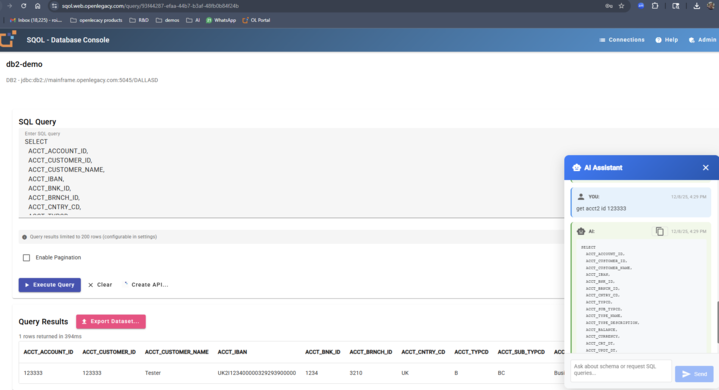
    • Added Chat support (with full schema in context)
    • Solved navigation issues
    • Added ability to click on table details columns or result columns to add WHERE automatically

    185991a8-5b01-4c18-8006-95b856190761-image.png


  • roi.mR

    Modernizing Green-Screen Access: Introducing OL Terminal for TN3270 & TN5250

    For decades, TN3270 and TN5250 terminals have been the gateway to mission-critical systems on IBM mainframe and IBM i. These systems still run the heart of many enterprises, but the access method has barely changed. Traditional desktop terminal clients introduce cost, maintenance, and security risks.

    OL Terminal changes that completely.

    OL Terminal provides a modern, browser-based experience that mirrors traditional green-screen environments, but with centralized management, secure access, and zero desktop dependencies.


    A Terminal Experience with No Installation

    Users simply open a browser and start working. There is nothing to install, update, or distribute. This eliminates:

    • MSI rollouts
    • Admin permissions
    • Manual configuration
    • Version inconsistencies across locations

    Any authorized user with a browser can access the host immediately.


    Secure Access Over HTTPS

    Traditional terminal connections often rely on unsecured TN streams. OL Terminal runs natively over HTTPS, introducing enterprise-grade security:

    • Central authentication
    • Encrypted sessions
    • SSO compatibility
    • Access control and auditing

    Remote workers operate with secure connectivity without requiring desktop VPN-installed emulators.


    Real-Time Terminal Interaction with WebSockets

    OL Terminal communicates using WebSockets, providing responsive user interaction:

    • Instant screen refreshes
    • Synchronized cursor position
    • Reliable keystroke delivery
    • Low latency even across distance

    The result is a true 1:1 experience comparable to classic installed emulators.


    Productivity Enhancements

    OL Terminal preserves a familiar terminal interface while introducing enhanced usability:

    Macros

    Automate multi-step sequences up to full process flows.

    Type-Ahead Support

    Users can continue entering commands even during screen transitions.

    Keyboard Mapping

    Define key layouts suitable for modern devices and user preferences.

    Print-to-PDF

    Export screens and workflows directly to PDF, without hardware printers.


    Centralized IT Control and Visibility

    Traditionally, green-screen usage is invisible once installed on desktops. OL Terminal changes this.

    Admin Session Viewer

    Support teams can observe session interaction live for:

    • Issue diagnosis
    • Training
    • Operational support

    Policy Enforcement

    Connection entry points, timeout values, routing paths, and identity rules can be defined centrally.

    Session Inventory

    Gain visibility into who is connected, where, and to which system.

    This simplifies support, audit readiness, and usage monitoring.


    OL Hub Integration – From Screens to APIs

    Combined with OpenLegacy Hub, OL Terminal helps organizations modernize screen-based transactions.

    Real session usage can be translated into:

    • Logical screen structures
    • Input/output data definitions
    • Sequence flows
    • Dynamic field relationships

    These are surfaced as screen-based APIs without modifying COBOL, RPG, or existing transactions.

    For example, customer lookup screens can become REST APIs using real navigation patterns observed through OL Terminal sessions.

    This lets organizations gradually migrate business workflows into digital channels.


    OpenLegacy TermIQ – Analytics, Insights & Auditing

    TermIQ extends OL Terminal with usage intelligence:

    • Identify frequently used screens
    • Measure operational efficiency
    • Detect repeated errors
    • Audit user navigation
    • Track processing time

    Examples of insights:

    • Why processing time differs across teams
    • Which flows frequently reach exception screens
    • Where user training gaps appear

    This visibility was previously unavailable in traditional emulation models.


    When OL Terminal Provides Maximum Value

    OL Terminal is ideal for:

    • Customer support centers
    • Back-office and processing teams
    • Distributed branches
    • Remote and offshore workers
    • Testing environments
    • Training environments

    All gain modern browser access without rollout effort.


    Why OL Terminal Matters

    OL Terminal uniquely combines:

    1. User familiarity — same screens, same workflow
    2. Centralized IT ownership — controlled access, observable sessions
    3. Modernization readiness — terminal flows become APIs and analytics inputs

    And the solution is free to use, lowering barriers for IT teams.


    Summary

    Area Value
    Access Web-based, no installation
    Security HTTPS encrypted access
    Operations Session visibility and control
    Productivity Macros, type-ahead, PDF export
    Modernization Screen-to-API creation with OL Hub
    Analytics TermIQ tracking, behavior insight

    OL Terminal modernizes access to mainframe and IBM i systems while preserving operational familiarity and offering IT new layers of visibility, control, and modernization opportunity.

    Simple to deploy. Secure by design. Free to use.

    This is the new standard for terminal access.


  • roi.mR

    Streamline Your OpenLegacy Development with Docker Compose

    Introduction

    If you're working with OpenLegacy tools, you know the pain of managing multiple services, configuring ports, and keeping track of different Docker commands. Today, I'm sharing a simple Docker Compose setup that brings all your OpenLegacy development tools together in one place, with a beautiful homepage to boot!

    The Problem

    Running OpenLegacy tools typically involves:

    • Memorizing (or constantly looking up) long docker run commands
    • Managing multiple container instances manually
    • Tracking which port runs which service
    • Dealing with volume permissions and data persistence
    • Remembering to set environment variables correctly

    It's tedious, error-prone, and takes you away from what matters: building great applications.

    The Solution

    I've created a streamlined Docker Compose configuration that launches all your OpenLegacy tools with a single command. The setup includes:

    • 🏠 A Beautiful Homepage (localhost:8080) - No more bookmarking multiple ports! A clean, modern landing page shows all your tools at a glance
    • 💻 OL Terminal (localhost:8081) - Your terminal-based development environment
    • ⚡ OL Code (localhost:8082) - Full-featured code editor
    • 🗄️ SQOL (localhost:8083) - SQL and data management interface

    Key Features

    One Command to Rule Them All

    Gone are the days of copy-pasting Docker commands. Just run:

    ./apps.sh start
    

    That's it. All services spin up, properly configured, with persistent data volumes.

    Centralized Configuration

    All credentials and licenses are managed in a single config.env file. Update once, apply everywhere. No more hunting through Docker commands to change a password or license key.

    Smart Data Persistence

    Your work is automatically saved in named Docker volumes that survive restarts, updates, and even system reboots. Data only disappears if you explicitly delete it—no more "where did my data go?" moments.

    Permission Issues? Solved.

    The setup runs containers with proper permissions out of the box. No more FileNotFoundException or permission denied errors when tools try to write configuration files.

    Professional Homepage

    The included landing page isn't just functional—it's genuinely nice to look at. With a modern gradient design, hover animations, and responsive layout, it makes accessing your tools a pleasure rather than a chore.

    Getting Started is Easy

    1. Clone the repository
    2. Copy your OpenLegacy license from your Community profile
    3. Paste it into config.env
    4. Run ./apps.sh start
    5. Visit http://localhost:8080

    That's the entire setup. No complex configuration, no troubleshooting, no headaches.

    Perfect for Teams

    The beauty of this setup really shines in team environments:

    • Consistent environments - Everyone runs the same configuration
    • Easy onboarding - New team members are productive in minutes
    • Version controlled - Check the compose file into Git (excluding the sensitive config.env)
    • Documentation included - Comprehensive README covers all common scenarios

    Beyond the Basics

    The helper script (apps.sh) provides convenient commands for common tasks:

    ./apps.sh logs     # View real-time logs
    ./apps.sh status   # Check service health
    ./apps.sh restart  # Quick restart
    ./apps.sh pull     # Update to latest versions
    

    It also automatically loads environment variables from config.env, ensuring your configuration is always in sync.

    Technical Highlights

    For those interested in the implementation details:

    • Uses official OpenLegacy ECR images
    • Lightweight nginx:alpine for the homepage (just 40MB!)
    • Named volumes for data persistence
    • Root user execution to avoid permission issues on Windows/Mac
    • Environment variable interpolation for flexible configuration
    • Restart policies for automatic recovery

    Conclusion

    This Docker Compose setup transforms OpenLegacy development from a juggling act into a smooth, professional workflow. Whether you're a solo developer or part of a larger team, having all your tools accessible from a single, beautiful interface makes a real difference in daily productivity.

    The entire setup is open and ready to use. Fork it, customize it, make it your own. Happy coding!


    Repository: https://github.com/openlegacy/apps-manager
    License: OpenLegacy
    Contributions: Welcome!

    Have questions or suggestions? Drop them in the issues section or reach out through the OpenLegacy Community.


  • roi.mR
    • Ability to use mock session with trail file. Demo trails are available out of the box for mainframe and AS/400 cards demo
    • Zip package (JAR deployment) now contains mainframe.sh and as400.sh scripts for deploy/start/stop JAR on a remote host via SCP & SSH

  • jeremiszlapkaJ

    Would love to pitch this higher up but w/out tn3270E our systems won't work.


    Hi @JZZSMB_gme , new version is available with JAR deployment on z/OS is available: https://forum.community.openlegacy.com/topic/23/new-version-1.4.8-is-available